
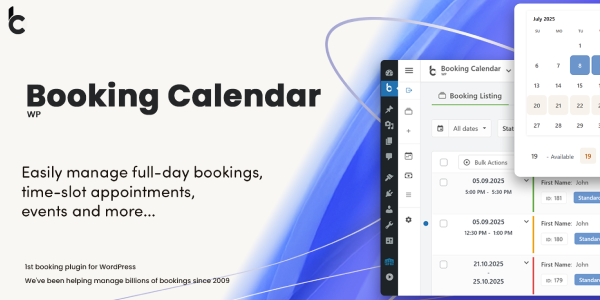
WP Booking Calendar is the oldest booking plugin in the WordPress directory – first released in 2009, and the original that every other booking plugin gets compared against. WP Booking Calendar Business Large is the edition that scales it to serious operations: multiple booking resources, capacity rules with per-resource counts, time slots, seasonal availability, advanced day filters, payment gateways, and searchable resources – the feature ladder the Business editions climb.
The 11.8.x releases (September 2026) are a striking burst: four releases in a week carrying new Form Builder templates, a redesigned Seasonal Availability catalog, formula-based cost options, and a full security hardening pass. Here’s the working review.
Competitive Features
- Multi-resource booking with capacity rules. Booking Large handles multiple resources (rooms, properties, services) with capacity rules – Adults-style quantity fields feeding per-resource availability, restored properly in 11.8.2.
- Form Builder with custom formulas. Booking forms build visually, and Business-tier Form Options Costs now support
if()conditions and math functions (min(),max(),round(),clamp()), including nested formulas (11.8.2) – pricing logic expressed in the form itself. - Seasonal Availability catalog (11.8). Resource-level default availability with season exceptions, twelve-month previews, and reviewed inline/bulk editing – the season management interface rebuilt.
- Time-slot templates (11.8.1). A two-column, two-step time-slots booking template with live date and time summaries – the appointment flow modernized.
- Searchable Resources Catalog (11.8). Search-availability settings with filters, Cards views, and landing-page configuration – the search layer for multi-property sites.
- Security hardening as a release theme. 11.8.3 restricted Form Builder option requests to allow-listed settings with server-defined nonces; 11.8 hardened public booking creation against administrator-only behavior activation and SQL error exposure; the Timeline got request tokens against script injection.
- Payment gateways with dedicated result pages. Payment success/failure pages with booking confirmation – the transaction flow completes visibly.
- Long lineage. First released August 2009 – seventeen years of booking development, the deepest history in the WordPress booking category.
Key Features
- Full-day and time-slot booking modes. The two booking models in one system, with edition-appropriate templates – full-day rentals and slot appointments both native.
- Form Builder with display tokens. Custom shortcode fields and the
wpbc-hidden-on-frontendCSS class (11.8.2) – form elements hidden publicly but editable in the Builder canvas. - Guided setup and welcome flow. Five-step guided setup ending in Form Builder, with starter-page previews and a welcome flow on clean installations.
- Three administration modes. Classic, Appointments, and Rentals modes with edition-aware navigation – the plugin adapts to the business type.
- Cost correction for admins. Manual cost adjustment on Add Booking and edit pages (restored in 11.8.1 with strengthened authorization retained).
- Multi-Resource booking summaries. Booking Listing summarizes multi-resource dates once with expanded periods and reserved resources (11.8.2) – the multi-resource booking view clarified.
- MySQL 9.6 compatibility. Booking creation and security hashes no longer depend on the optional MD5() database function – forward-compatibility with modern MySQL.
- Translation completeness. Dutch, Spanish (Spain), French (France), and Ukrainian translations completed (11.8.3).
Comparison with Competitors
WP Booking Calendar vs Amelia
The legacy heavyweight versus the modern challenger in WordPress booking.
| Aspect | WP Booking Calendar | Amelia |
|---|---|---|
| Architecture | Calendar-first, edition ladder | Service-first app |
| Setup depth | Deep, mode-based | Guided wizard |
| Payment gateways | Multiple with result pages | Major gateways |
| Not the focus | Native channel |
Amelia wins on modern UX and multi-channel messaging; Booking Calendar wins on seventeen years of booking-domain depth – seasonal availability, capacity rules, and search catalogs that the newer platforms are still building.
WP Booking Calendar vs WooCommerce Bookings
The standalone-versus-commerce comparison for rental-style booking.
| Aspect | WP Booking Calendar | WooCommerce Bookings |
|---|---|---|
| Model | Calendar resources | Bookable products |
| Checkout | Own booking flow | WooCommerce cart/checkout |
| Seasonal availability | Native catalog | Availability rules |
| Capacity | Per-resource rules | Resources + shared pools |
WooCommerce Bookings wins when bookings belong in the store; Booking Calendar wins when the booking flow is the site’s primary function with its own payment path.
Recommended Stack: Booking-heavy sites that also sell merchandise pair the calendar system with store commerce – rental operations pair it with Vik Rent Car Pro when fleet-scale logic (per-unit inventory, deposits, location pricing) outgrows calendar resources.
Official Changelog
The registry tracks three versions for this plugin; the changelog covers them below.
Version 11.8.3
Release Date: September 17, 2026
- Completed Dutch, Spanish (Spain), French (France), and Ukrainian translations
- Security: Form Builder option requests restricted to explicitly registered settings with fixed server-defined nonces and multi-option allowlists
- Security: hardened public Timeline navigation with mandatory request tokens and allow-listed Resource-link options
Version 11.8.2
Release Date: September 16, 2026
- Custom Shortcode field in Form Builder for display tokens and Form Options Cost hints
wpbc-hidden-on-frontendCSS class for hiding elements on public forms- Form Options Costs now support
if()conditions andmin(),max(),abs(),round(),ceil(),floor(),clamp()functions with nested formulas - Security: hardened Form Options Costs with permission checks, expression allow lists, and bounded parser input
- Fixed capacity-rules quantity field lists and multi-Resource date summaries in Booking Listing
Version 11.8.1
Release Date: September 13, 2026
- New two-column, two-step Time Slots booking template with live date/start-time/end-time summary
- Two-step welcome flow on Booking Listing after clean installation with starter-page previews
- Payment success pages include booking confirmation; gateways use generated success/failure page addresses
- Restored administrator Cost correction on Add Booking and edit pages with strengthened authorization
Frequently Asked Questions
What distinguishes the Business Large edition?
Multi-resource booking with capacity rules, searchable resources catalogs, and the advanced scheduling features – the tier above Business Medium’s seasonal pricing, designed for properties and services with multiple bookable units and search-driven availability.
Is the GPL version the full plugin?
Yes. The GPL build is the complete Business Large source under its original license with all edition features enabled. The vendor license key for auto-updates is the only absence.
Can I use it on multiple sites?
The GPL license permits unlimited installations across personal and client sites without per-domain activation.
Does it handle both rentals and appointments?
Yes – the plugin ships Classic (full-day rentals), Appointments, and Rentals administration modes with edition-aware navigation, plus the 11.8.x time-slot templates for appointment-style booking.
How is the security track record?
Exceptionally thorough in recent releases: 11.8 hardened public booking creation against administrator-only behavior activation and information disclosure, 11.8.2 added mutation-time permission checks and expression allow-lists on cost formulas, and 11.8.3 closed option-access and Timeline injection paths. The 11.8 update requires clearing page and CDN caches – the vendor documents this explicitly.
Which WordPress version does it support?
Current with WordPress 7.x and MySQL 9.6+ compatibility (MD5 dependency removed in 11.8) – a seventeen-year-old plugin with actively maintained modern-platform support.
Leave a Reply